87 Gibson Ave, Padstow NSW 2211 (02) 8739 2050
Mon - Fri: 9am - 5pm | Sat: 10am - 2pm | Sun & Public Holidays: ClosedMon - Fri: 9am - 5pm · Sat: 10am - 2pmSun & Public Holidays: Closed
87 Gibson Ave, Padstow NSW 2211(02) 8739 2050
Mon to Fri 9am to 5pm, Sat 10am to 2pm

Tag Archives: mobile repair

iPhone 15 Repair: Tips to Avoid Expensive Fixes in the Future

iPhone 15 Repair: Tips to Avoid Expensive Fixes in the Future

The iPhone 15 is the pinnacle of Apple’s technological advancements, featuring an unparalleled design, innovative features, and exceptional performance. As one of the most advanced smartphones on the market, it comes with a premium price tag, making it essential to maintain the device properly to avoid expensive repairs. Whether it’s a cracked screen, water damage, or a battery issue, repair costs for an iPhone 15 can quickly escalate if preventive measures are not taken. This guide provides actionable tips to help you protect your investment and reduce the likelihood of costly repairs.

1. Invest in High-Quality Accessories

Protective Cases and Screen Guards

The iPhone 15 features a stunning edge-to-edge display, making it prone to damage if dropped. Invest in a robust protective case that shields the corners, back, and sides from impact. Pair this with a tempered glass screen protector to prevent scratches and cracks on the screen. Rugged cases with shock-absorbent materials and raised edges provide additional protection.

MFi-Certified Chargers and Cables

MFi (Made for iPhone) certified accessories are designed to meet Apple’s standards, ensuring compatibility and safety. Cheap, uncertified chargers can damage the battery, cause overheating, and even lead to short circuits. Always choose genuine Apple chargers or MFi-certified alternatives for optimal performance.

2. Handle with Care

Avoid Water Damage

Although the iPhone 15 boasts advanced water resistance, prolonged or repeated exposure to liquids can compromise its internal components. Avoid using your phone in high-humidity environments like saunas, bathrooms, or during heavy rain. Consider using waterproof pouches for added safety during outdoor activities.

Be Cautious with Pressure

The sleek and slim design of the iPhone 15 makes it susceptible to bending under excessive pressure. Avoid carrying it in your back pocket or placing it under heavy objects. For added protection, opt for a hard-shell case that reinforces the device’s structure.

3. Maintain Battery Health

Smart Charging Practices

Battery degradation is one of the most common issues with smartphones. To prolong your iPhone 15’s battery life, avoid letting it drop below 20% or charging it above 80% for extended periods. Utilise the iPhone’s Optimized Battery Charging feature, which delays full charging until you need it.

Avoid Extreme Temperatures

Exposure to temperatures outside the recommended range (32°F to 95°F or 0°C to 35°C) can significantly affect battery performance. Extreme heat can accelerate battery ageing, while cold temperatures can temporarily reduce its capacity.

4. Update Software Regularly

Apple frequently releases iOS updates that include critical security patches, bug fixes, and performance enhancements. Keeping your software updated ensures that your iPhone 15 remains secure and runs smoothly. To check for updates, go to Settings > General > Software Update and install the latest version.

5. Use Storage Wisely

Clear Unnecessary Data

Overloading your device with data can lead to slower performance and reduced efficiency. Regularly delete unused apps, duplicate photos, and unnecessary files to free up storage space.

Backup Your Data

Frequent backups using iCloud or an external drive can prevent data loss in case of accidental damage or system failure. By maintaining backups, you can quickly restore your data without the stress of losing important files.

Iphone Battery Repair

6. Avoid DIY Repairs

When your iPhone 15 experiences issues, avoid attempting to fix it yourself. DIY repairs often lead to further damage and void Apple’s warranty. For complex problems, it’s best to consult professionals. Mobile Repair Factory in Sydney specialises in iPhone repairs, ensuring reliable service with genuine parts.

7. Choose Reliable Repair Services

When you face unavoidable repairs, selecting a trusted repair service is crucial. Mobile Repair Factory in Sydney offers expert iPhone repair solutions, including screen replacements, battery replacements, and hardware repairs. Their team of certified technicians handles your device with care, using original components to restore functionality.

8. Proactive Care Tips

Regular Cleaning

Dust and debris can accumulate in the charging port, speakers, and microphone, affecting functionality. Use a soft, dry brush or compressed air to clean these areas gently. Avoid using liquids or sharp objects, as they can damage delicate components.

Avoid Overloading the Device

Running multiple apps simultaneously or playing resource-intensive games for extended periods can overheat your phone and strain the processor. Regularly close unused apps and restart your phone to keep it running efficiently.

9. Insure Your Device

Comprehensive insurance for your iPhone 15 can be a lifesaver in case of accidental damage, theft, or loss. Look for insurance plans that cover cracked screens, water damage, and hardware malfunctions. This added layer of security can save you from unexpected repair expenses.

10. Be Mindful of Apps and Permissions

Download Apps from Trusted Sources

Only download apps from the Apple App Store to avoid malware or viruses. Third-party apps from unverified sources can compromise your device’s security and cause data breaches.

Review Permissions

Many apps request unnecessary permissions. Regularly review and manage app permissions to protect your privacy and prevent misuse of sensitive data.

11. Long-Term Usage Tips

Proper Storage: Store your iPhone in a dedicated pouch or a compartment within your bag to prevent scratches.

Avoid Using While Charging: Overuse during charging can lead to overheating and battery wear.

Address Issues Promptly: Ignoring early signs of trouble, such as unresponsive buttons or flickering screens, can lead to more significant problems down the line.

Conclusion

The iPhone 15 is more than just a smartphone—it’s an investment. Taking proactive steps to care for your device can extend its lifespan, save you money on repairs, and ensure it performs at its best. From using high-quality accessories and maintaining battery health to choosing reliable repair services, these tips can help you avoid costly fixes.

If you encounter any issues with your iPhone 15, Mobile Repair Factory in Sydney is here to help. Their reputation for excellence allows them to provide reliable and affordable repair solutions, restoring your device to optimal condition. By following these preventive measures and relying on trusted professionals when needed, you can enjoy your iPhone 15 worry-free for years to come.


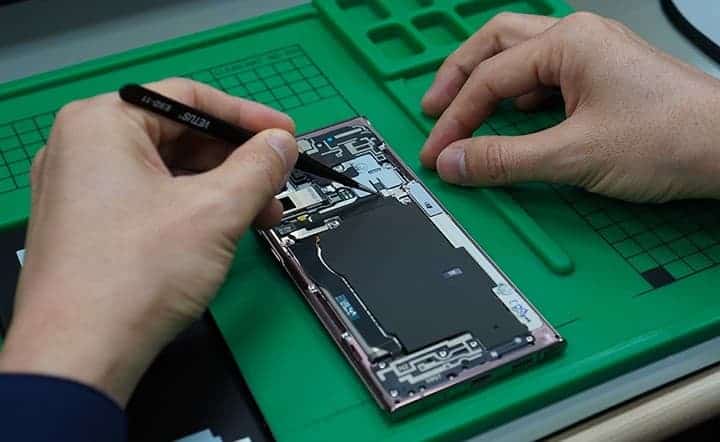


Top 5 Signs Your Smartphone Needs Immediate Repair

Top 5 Signs Your Smartphone Needs Immediate Repair

Your smartphone is more than a device; it’s a lifeline that connects you to the world. From staying in touch with loved ones to running your business, your phone works tirelessly. But what happens when it starts acting up? Is it a minor hiccup or a call for help? Recognising when your smartphone needs repair can save you from bigger problems down the road.

At Mobile Repair Factory, we understand how crucial your phone is. That’s why we’ve compiled the top 5 signs your smartphone needs immediate repair to help you catch issues early. Let’s dive in.

1.Cracked or Damaged Screen

Why It Matters

A cracked screen isn’t just a cosmetic issue; it can affect your phone’s functionality. Over time, cracks can worsen, leading to:

  • Touchscreen malfunctions
  • Display glitches (flickering or dead pixels)
  • Dust and moisture seeping into the device

Signs to Watch For

  • Parts of the screen are unresponsive to touch
  • Ghost touches (when the phone responds to touches you didn’t make)
  • Visibility issues due to shattered glass

Don’t wait for the problem to escalate! A cracked screen could be a gateway to more expensive repairs if left unaddressed.

2.Battery Draining Rapidly

Why It Matters

Does your phone seem to lose its charge faster than usual? A draining battery can disrupt your day and might indicate deeper issues like:

  • A failing battery
  • Software glitches
  • Excessive background app usage

IPad Battery Repair

Signs to Watch For

  • Your phone struggles to hold a charge for a full day
  • It shuts down unexpectedly, even with sufficient battery percentage
  • The phone heats up while charging

At Mobile Repair Factory, we specialise in battery replacements that breathe new life into your device.

3.Overheating

Why It Matters

While occasional warmth is normal, persistent overheating is not. Overheating can:

  • Damage internal components
  • Reduce battery lifespan
  • Cause safety hazards

Signs to Watch For

  • The phone becomes hot during light use
  • Overheating when using specific apps or while charging
  • Performance slows down due to heat throttling

If your phone feels like it’s on fire, it’s time to visit a professional. Ignoring this sign could lead to permanent damage.

4.Unresponsive Buttons or Ports

Why It Matters

Physical buttons (like the power and volume buttons) and ports (for charging or headphones) are essential for daily use. When these fail, your phone’s usability takes a major hit.

Signs to Watch For

  • Buttons that require extra pressure to function
  • Loose charging ports causing connection issues
  • Static or no sound from headphone jacks

Often, dirt or debris can block buttons or ports, but in some cases, internal damage might be the culprit. At Mobile Repair Factory, we’ll quickly diagnose and fix the issue to restore functionality.

5.Frequent Freezing or Crashing

Why It Matters

A smartphone that freezes or crashes repeatedly is not only frustrating but also unreliable. This could be due to:

  • Software issues
  • A lack of storage space
  • Hardware malfunctions

Signs to Watch For

  • Apps that crash frequently
  • The phone restarts on its own
  • Delays when switching between apps or tasks

Sometimes, a simple software update or clearing cache can solve the issue. However, if the problem persists, professional repair is the best option.

Why Choose Mobile Repair Factory?

When your phone shows any of these signs, you need a reliable repair service you can trust. At Mobile Repair Factory, we offer:

  • Expert Repairs: From screen replacements to battery issues, we fix it all.
  • Warranty on Repairs: Enjoy peace of mind knowing all our work is covered.
  • Experienced Technicians: With extensive experience in the mobile phone repair industry, we handle every brand and model.

Tips to Extend Your Smartphone’s Lifespan

To avoid frequent repairs, follow these simple tips:

  1. Use a Screen Protector and Case: Prevent physical damage.
  2. Keep Software Updated: Updates fix bugs and enhance performance.
  3. Avoid Overcharging: It can overheat the battery.
  4. Regularly Clean Ports and Buttons: Remove dust and debris for better functionality.

Conclusion

Spotting the top 5 signs your smartphone needs immediate repair can save you time, money, and stress. Whether it’s a cracked screen, battery issues, or unresponsive buttons, acting fast is the key to avoiding bigger problems.

Choose Mobile Repair Factory for all your mobile phone repair needs in Sydney. With our expertise and commitment to quality, we’ll get your phone back in perfect working condition. Don’t let your smartphone woes hold you back—contact us today!


Our Padstow technicians repair iPhone, Samsung, OPPO and iPad devices. See our iPhone repairs Sydney, Samsung screen repair Sydney and iPad screen repair Sydney pages.

phone repairs shops near me

The Evolution of Mobile Phones: How Repairs Have Changed Over the Years

Mobile phones have evolved dramatically over the past few decades, becoming indispensable tools in our daily lives. From bulky devices with limited functionality to sleek, powerful smartphones, the transformation of mobile technology has been remarkable. This evolution has significantly impacted the way mobile phones are repaired, ushering in new challenges, techniques, and opportunities in the repair industry. Let’s explore how mobile phone repairs have changed over the years and why services like Mobile Repair Factory in Sydney play a vital role in keeping us connected.

The Early Days: Simple Repairs for Basic Phones

In the early days of mobile phones, devices were primarily designed for making calls and sending texts. These phones, often referred to as “feature phones,” had simple designs with physical keypads and monochrome screens. Repairs during this era were straightforward due to the limited number of components.

Technicians primarily dealt with issues such as broken antennas, cracked screens, or malfunctioning buttons. The parts were easily accessible, and repairs were generally quick and affordable. Mobile repair businesses thrived by catering to a growing demand as phones became more common.

The Smartphone Revolution: Complex Repairs Begin

The launch of the iPhone in 2007 marked a turning point in mobile technology. Smartphones brought advanced features such as touchscreens, cameras, and internet connectivity, revolutionising the way we communicate and interact with the world. However, this advancement also made phone repairs more complex.

With the advent of smartphones, repairs now required specialised skills and tools. Touchscreens were more delicate and prone to cracks, while internal components like batteries and processors became smaller and harder to access. Repair shops had to adapt quickly, investing in training and equipment to meet the demands of repairing advanced devices. Services like iPhone Screen Repairs Sydney and Samsung Screen Repairs Sydney became essential as these brands gained popularity.

Mobile Phone Repairs

The Rise of Brand-Specific Repairs

As mobile technology advanced, each brand began using proprietary designs and parts. Apple, Samsung, Oppo, and other major players introduced unique features such as Retina displays, curved screens, and advanced cameras, which made repairs more challenging.

Brand-specific repairs often required technicians to source high-quality replacement parts compatible with each model. This created a demand for trusted service providers like Mobile Repair Factory, known for their expertise in handling repairs for various brands.

Additionally, repair services expanded to include not just phones but also tablets like iPads and Samsung tablets. For instance, iPad Repairs Sydney became a specialised service catering to users who needed expert assistance for their devices.

The Role of Third-Party Repair Providers

While manufacturers offered repair services, third-party providers like Mobile Repair Factory became popular for their affordability and convenience. These independent shops provided a cost-effective alternative for users who needed quick repairs without breaking the bank. They also catered to a wider range of devices, offering services such as:

  • Screen replacements for cracked displays
  • Battery replacements for phones with reduced battery life
  • Software troubleshooting for frozen or malfunctioning devices
  • Water damage repairs for accidental spills

Mobile Repair Factory set itself apart by offering warranties on all repairs and using high-quality parts, ensuring customer satisfaction and reliability.

Technological Advances and New Repair Challenges

As smartphones continued to evolve, so did the challenges associated with repairs. Modern phones now include advanced features such as:

  • Face and fingerprint recognition
  • Wireless charging
  • Foldable screens
  • 5G connectivity

These innovations have added layers of complexity to the repair process. For instance, foldable screens require technicians to understand entirely new mechanisms, while repairing a phone with biometric security features demands precision and expertise.

Mobile Repair Factory has embraced these challenges, using the latest repair techniques and methods to keep up with advancements. Their experienced technicians ensure that even the most complex issues are resolved efficiently.

Sustainability and the Repair Industry

In recent years, the mobile phone repair industry has played a crucial role in promoting sustainability. With growing concerns about electronic waste, repairing devices instead of replacing them has become an environmentally friendly choice. Mobile Repair Factory contributes to this movement by extending the lifespan of devices, reducing waste, and offering refurbished phones at competitive prices.

Customers can purchase pre-owned devices like the iPhone 6s Silver 64GB Unlocked or the iPhone SE Rose Gold 64GB Unlocked at discounted rates, combining affordability with sustainability.

The Importance of Customer-Centric Services

Today, customer service is a cornerstone of the repair industry. Mobile Repair Factory prioritises its customers by offering:

  • Free quotes for repairs
  • Quick turnaround times
  • Priority service for business clients
  • Comprehensive warranties on all repairs

Their commitment to quality and customer satisfaction has earned them a reputation as one of the best mobile phone repair shops in Sydney. Whether you’re searching for “phone repair shops near me” or “cheap mobile phone repairs in Sydney,” Mobile Repair Factory stands out as a reliable choice.

The Future of Mobile Phone Repairs

As mobile technology continues to advance, the repair industry will undoubtedly face new challenges. Foldable devices, augmented reality (AR) capabilities, and AI-powered features are likely to dominate future designs. Repair services will need to innovate constantly to keep pace with these changes.

Mobile Repair Factory is well-positioned to adapt to the future, thanks to its extensive experience, skilled technicians, and customer-first approach. Since 2008, they have been serving Sydney’s residents, covering areas like Sutherland Shire, Padstow, and Bankstown, with top-notch repair solutions.

Conclusion

The evolution of mobile phones has transformed the repair industry, from simple fixes for basic devices to sophisticated repairs for advanced smartphones. As technology advances, the demand for skilled repair services will continue to grow. Mobile Repair Factory remains at the forefront, offering reliable, affordable, and high-quality repairs that keep Sydney connected. Whether it’s a cracked screen, a software issue, or a refurbished phone purchase, Mobile Repair Factory is the go-to destination for all your mobile repair needs.


The Importance of Using Quality Parts in Mobile Repairs

The Importance of Using Quality Parts in Mobile Repairs

Smartphones and tablets have become indispensable tools for communication, business, entertainment, and more in the fast-paced, technologically advanced society of today. As such, the breakdown or failure of these gadgets not only disrupts personal lives but also frequently interferes with work. We cannot ignore the vital component of mobile device repair, which is the calibre of the parts used in the procedure. Using premium parts in mobile repairs is critical for a number of reasons, including extending the device’s life, preserving the best performance, and protecting user safety.

Longevity and Durability

One of the primary reasons for using quality parts for mobile repairs is to ensure the device’s longevity and durability. Cheap, substandard parts may offer a temporary fix but often fail prematurely, leading to repeated breakdowns and additional repair costs. For instance, a low-quality screen replacement might crack easily or have poor touch sensitivity, necessitating another repair in a short period of time. Conversely, high-quality parts adhere to the device’s original specifications, offering a more dependable and durable solution. This not only saves the user from frequent repair hassles but also proves to be more cost-effective in the long run.

Mobile Phone Repair

Mobile Phone Repair

Optimal Performance

Maintaining the optimal performance of a smartphone or tablet is another crucial factor in choosing quality parts for repairs. Precision engineering ensures that each component of mobile devices functions harmoniously to deliver the desired performance. Subpar replacement parts can disrupt this balance, leading to issues such as decreased battery life, slower processing speeds, or diminished display quality. For example, using a non-original battery can result in poor battery performance and even pose the risk of overheating or swelling. High-quality parts, however, ensure that the device continues to perform as intended by the manufacturer, offering the user a seamless experience.

User Safety

User safety is paramount when it comes to mobile repairs. Poor-quality parts can pose significant safety risks, from minor irritations like skin allergies due to low-grade materials to more severe hazards like fire or electric shocks caused by faulty batteries or chargers. Reports of mobile phones catching fire due to substandard batteries are not uncommon. Repair technicians can prevent such dangerous incidents by using high-quality, certified parts. These parts undergo rigorous testing to meet safety standards, ensuring their safety and not compromising the user’s well-being.

Warranty and Reliability

Reputable repair services often provide warranties on their repairs, but these warranties are only as good as the parts they use. Quality parts typically come with their own manufacturer’s warranties, offering an additional layer of protection for the consumer. This not only assures the user that the repair is reliable, but it also demonstrates the repair service’s commitment to quality and customer satisfaction. When a repair service uses genuine or high-quality aftermarket parts, it indicates that they stand by their work and are confident in the repair’s durability and performance.

Preserving Device Value

For those who might consider reselling their device in the future, maintaining the device’s value is essential. Repairs conducted with high-quality parts help preserve the device’s resale value. Devices repaired with cheap, unreliable parts may cause potential buyers to anticipate further issues down the line. Conversely, a well-functioning device, repaired with high-quality parts, can fetch a higher price in the secondary market.

Environmental Impact

Using quality parts in mobile repairs also has a positive environmental impact. Poor-quality parts are more likely to fail and need replacing more frequently, leading to increased electronic waste. High-quality parts, by lasting longer, reduce the frequency of replacements and thus help to minimise the environmental footprint. Furthermore, the manufacturing of many quality parts incorporates improved environmental practices, thereby enhancing sustainability.

Professional Integrity and Reputation

For repair businesses, using quality parts is crucial for maintaining professional integrity and building a good reputation. Customers trust repair services to provide effective and reliable solutions for their damaged devices. Consistently using high-quality parts helps build trust and loyalty among customers, leading to repeat business and positive word-of-mouth recommendations. Conversely, a repair shop known for using inferior parts might quickly gain a bad reputation, driving customers away.

Conclusion

Mobile Repair Factory believes excellent parts are essential for mobile repairs. Quality parts assure gadget longevity, user safety, repair reliability, and value. Users and repair professionals benefit from high-quality parts in terms of financial savings, safety, environmental sustainability, and professional reputation. For technicians and customers, quality is critical to customer satisfaction and peace of mind. To keep your gadget running smoothly, Mobile Repair Factory uses only the best parts and provides the best service. Its mobile repair services will show you the difference quality makes.


Common mobile phone issues and how to fix them

Common mobile phone issues and how to fix them

Mobile phones are an essential part of our daily lives, but like any technology, they are prone to issues. Here are some common problems that mobile phone users encounter, along with practical solutions to address them:

1. Broken or cracked screen

Issue:

A broken or cracked screen is one of the most common problems. It can occur from drops, impacts, or pressure.

Solution:

  • DIY Fix: Temporary solutions include using clear tape or a screen protector to hold the cracks together and prevent further damage.
  • Professional Repair: If you need a permanent fix, contact a professional repair service. They can replace the broken screen with a new This is especially recommended for expensive devices where DIY repairs might not be feasible.

2. Battery Draining Quickly

Issue:

Battery life decreases significantly over time, or your phone might be losing charge faster than usual.

Solution:

  • Settings Adjustments: Reduce screen brightness, turn off background app refresh, disable location services, and close unused apps.
  • Battery Replacement: If the battery is old or damaged, consider getting it replaced by a professional. Modern smartphones often have sealed batteries, making professional help necessary.

Mobile Phone Repair

Mobile Phone Repair

3. Overheating

Issue:

Phones can overheat due to extensive usage, exposure to high temperatures, or hardware issues.

Solution:

  • Immediate Actions: Remove the phone from any heat source and let it cool down. Avoid using intensive apps while the phone is cooling.
  • Preventive Measures: Avoid direct sunlight, reduce usage of high-demand apps, and turn off unnecessary background processes.
  • Professional Check: Persistent overheating might indicate a deeper issue. A professional can diagnose and fix internal problems, such as a faulty battery or malfunctioning hardware.

4. Unresponsive Screen

Issue:

The touch screen becomes unresponsive or lags, making it difficult to use the phone.

Solution:

  • Restart Your Phone: Sometimes, a simple restart can fix temporary software glitches causing the unresponsive screen.
  • Free Up Memory: Clear cache, delete unused apps, and ensure your phone has enough free storage space.
  • Factory Reset: As a last resort, a factory reset can clear any persistent issues. Be sure to back up your data first.
  • Professional Repair: If the problem persists, it could be a hardware issue. Professional repair services can replace or fix the faulty screen or digitizer.

5. Slow Performance

Issue:

Phones can become sluggish over time, taking longer to open apps or perform tasks.

Solution:

  • Software Updates: Ensure your phone’s software is up-to-date. Manufacturers often release updates to improve performance.
  • App Management: Uninstall unnecessary apps and delete unused files. Use performance-boosting apps to clean up your phone’s system.
  • Reset to Factory Settings: If the phone remains slow, consider a factory reset. Remember to back up your data beforehand.
  • Professional Help: It is possible that persistently slow performance is due to hardware issues. A professional can diagnose and repair these problems.

6. Connectivity Issues

Issue:

Problems with Wi-Fi, Bluetooth, or mobile data connections can be frustrating.

Solution:

  • Reset Connections: Turn off and then on the Wi-Fi, Bluetooth, or mobile data. Forget the network and reconnect.
  • Update Software: Ensure your phone’s software is up-to-date, as updates can fix connectivity bugs.
  • Network Settings Reset: Reset your network settings. This will delete saved Wi-Fi passwords, so have those
  • Professional Diagnosis: If the issue persists, it might be a hardware problem. Professionals can diagnose and repair antennas or internal components.

7. Apps Crashing or Freezing

Issue:

Apps may crash or freeze unexpectedly, disrupting usage.

Solution:

  • Update Apps: Ensure all apps are updated to the latest versions. Developers often release updates to fix bugs and compatibility issues.
  • Clear App Cache: Go to your phone’s settings and clear the cache of the problematic apps.
  • Reinstall Apps: Uninstall and then reinstall the apps that are crashing.
  • Professional Assistance: If the problem continues, a professional can help diagnose if there’s a deeper issue, such as software corruption.

8. No Sound or Distorted Sound

Issue:

There are issues with the phone’s audio, including the absence of audio during calls, music, or notifications, or a distorted quality of sound.

Solution:

  • Check Settings: Ensure that sound settings are properly configured. Make sure the volume is up and the phone is not in silent mode.
  • Clean Speaker and Microphone: Dust and debris can block speakers and microphones. Clean them gently with a soft brush or compressed air.
  • Software Update: Update your phone’s software to fix any bugs affecting the audio.
  • Professional Repair: Persistent sound issues may require professional repair. The speakers or microphones might need to be repaired or replaced.

9. Camera Issues

Issue:

The camera is blurry, won’t open, or has other functional problems.

Solution:

  • Clean the Lens: Ensure the camera lens is clean and free from smudges or dirt.
  • Restart the Phone: Sometimes, a restart can fix camera glitches.
  • Update Software: Make sure to update the phone’s software and camera app.
  • Factory Reset: If problems persist, consider a factory reset after backing up your data.
  • Professional Repair: If the camera is still not working, it could be a hardware issue. Professional repair services can fix or replace the camera module.

10. Water damage

Issue:

Water damage can cause various issues, from the phone not turning on to malfunctioning components.

Solution:

  • Immediate Action: Turn off the phone immediately and do not turn it on. Remove the SIM card, memory card, and battery (if possible).
  • Dry the phone: Use a dry cloth to remove excess water. Place the phone in a bag of uncooked rice or use silica gel packets to absorb moisture. Leave it for at least 48 hours.
  • Professional Repair: Water damage can cause severe internal problems. Professional repair services can clean, repair, or replace damaged components.

Conclusion

You can fix some mobile phone issues yourself, but others require professional help. Mobile Repair Factory is a trusted repair business that can fix your phone, even with more serious issues. Maintenance, software upgrades, and judicious use can prevent many common issues. Combine these techniques to extend and optimize your mobile device.


Unveiling Affordable Mobile Repair Secrets in Sydney

Unveiling Affordable Mobile Repair Secrets in Sydney

The mobile phone has become a necessary part of our daily lives in our fast-paced world. They are an indispensable tool for keeping connected, organised, and entertained, making them an essential tool for both personal and professional use. However, the convenience they provide comes with a downside: the potential for damage and the need for repairs.

Many individuals are benefited by the availability of affordable mobile repair services in Sydney, a city that thrives on technology. In this guide, we’ll unveil some secrets to help you access reliable and budget-friendly mobile repair solutions in Sydney.

Mobile Repairing Shop

1. Research and compare prices:

Thorough research is one of the first stages in choosing cost-effective mobile repair services. Use internet platforms to compare rates supplied by various repair businesses in Sydney. Look for customer reviews and ratings to determine the level of service offered by each repair centre. Websites like Google Maps, Yelp, and Facebook might be useful for getting this information.

2. Consider Local Repair Shops:

While well-known repair chains may appear handy, they frequently come with higher prices. Local repair businesses in Sydney may offer affordable prices while providing personalised service. These shops rely on favourable word-of-mouth and repeat business, so they are compelled to provide high-quality repairs at cheap

3. Check for Warranty and Guarantees:

When choosing a mobile repair company, ask about warranties and guarantees on the repairs they undertake. Reputable repair shops in Sydney will frequently offer a guarantee term during which they will fix any problems with the repair for free. This not only provides peace of mind but also demonstrates the repair centre’s trust in their job.

4. DIY Repairs for Minor Issues:

Not every mobile phone problem necessitates expert help. Consider DIY fixes for small concerns, such as a broken screen protector or a malfunctioning app, by following online guides and purchasing repair supplies. To prevent inflicting more damage, proceed with caution and verify you have the relevant knowledge and tools before trying any DIY repairs.

5. Explore Third-Party Repair Services:

Aside from certified service centres, there are various third-party repair firms in Sydney that provide cost-effective solutions. These freelance technicians are frequently knowledgeable and experienced with a variety of mobile phone types. You may save greatly on repair expenses by using a trustworthy third-party repair provider that does not sacrifice quality.

6. Opt for Refurbished Parts:

Aside from certified service centres, there are various third-party repair firms in Sydney that provide low-cost solutions. These freelance technicians are frequently knowledgeable and experienced in working with a wide range of mobile phone models. You may save a lot of money on repairs without sacrificing quality by using a trustworthy third-party provider.

7. Negotiate and Bundle Services:

Don’t be afraid to bargain with repair businesses in Sydney, especially if you need several repairs or services. Many repair shops provide discounts for bundled services or may be ready to negotiate pricing, particularly with repeat clients. Polite and courteous negotiating might save you a lot of money on your cellphone.

8. Attend Repair Workshops and Events:

Keep a watch out for mobile repair seminars and events happening in Sydney. These events frequently include information on DIY repairs, upkeep advice, and may even provide reduced repair services onsite. Participating in such activities may help you not only save money but also improve your understanding of mobile phone repair.

9. Verify Technician Qualifications:

Before you commit your phone to a repair specialist, be sure they are qualified and skilled. Enquire about their credentials, training, and experience dealing with your particular device model. A qualified expert will not only perform effective repairs but will also reduce the possibility of more damage throughout the repair process.

10. Maintain Regular Device Care:

Prevention is always preferable to cure when it comes to mobile phone repairs. Maintain regular device maintenance by utilising protective cases, screen protectors, and keeping your phone away from water and harsh temperatures. By taking proactive steps, you may minimise the frequency of repairs and extend the life of your mobile device.

Conclusion

Mobile Repair Factory provides affordable mobile repair services in Sydney with the proper approach and understanding. You may save money while keeping your mobile phone in good working order by researching, comparing pricing, evaluating local repair shops, investigating DIY methods for minor difficulties, and utilising third-party services. Furthermore, practicing preventative maintenance and being up-to-date on repair procedures will help you own a mobile phone for less money in Sydney.

Our Address

87 Gibson Avenue, Padstow, New South Wales, 2211 Australia

Working hours:
Mon‑Fri 09:00am‑05:30pm
Sat 10:00a.m‑03:00pm

(02) 8739 2050

phone repairs

5 Signs Your Phone Needs Professional Repair

Introduction:

The smartphone has become a significant part of our daily lives in the digital age. Communication, entertainment, and staying connected are all possible through them. Like all other electronic devices, smartphones are susceptible to wear and tear, malfunctions, and damage. The majority of issues can be resolved with basic troubleshooting. However, some signs indicate it is necessary to seek professional assistance. In this article, we will examine five common signs that indicate that it is time to seek expert assistance to ensure your phone restores its optimal functionality.

Tips to extend the lifespan of your mobile phone

Tips to extend the lifespan of your mobile phone

Mobile phones have become an indispensable component of our daily life. They are essential to everything we do, from communication to entertainment. Even though we use our phones frequently, we frequently neglect the upkeep and maintenance required to increase their lives. Here are some pointers to help you prolong the life of your phone and maintain its good condition:

Samsung S8 Repairs

A guide to selecting the best iPhone and iPad repair shops in Sydney

Are you planning to get your iPhone or iPad repaired in Sydney? If yes, then you may be wondering where to get it done. Choosing the best repair shops in Sydney can be a tough task, you have to consider so many important factors before making any final decision. Here in this guide, we have tried to share some useful points that can help you make the right selection, check the details below:

Product Enquiry

By sending this inquiry you accepted the MRF team can contact you in regards to your inquiry. We don't use or sell any of our customers data for marketing purposes. We take every precaution to secure your data. Mobile Repair Factory take no responsibility for any mishap. By sending the inquiry you accepted the terms of the inquiry form and the website.
CALL US NOW